Navigation


1.8 — Programs with multiple files

As programs get larger, it is not uncommon to split them into multiple files for organizational purposes. One advantage of working with an IDE is they make working with multiple files much easier. You already know how to create and compile single-file projects. Adding new files to existing projects is very easy.

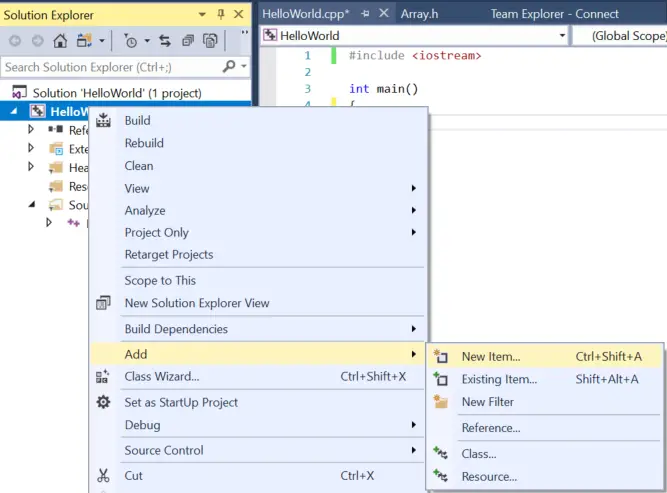
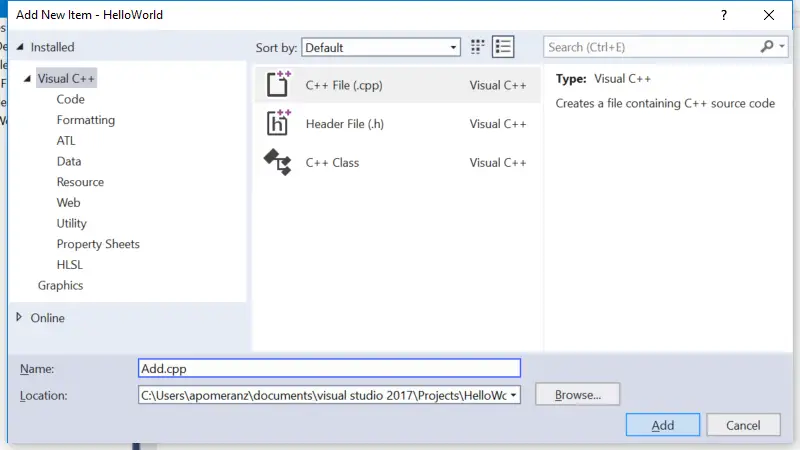
In Visual Studio 2005 Express, right click on “Source Files” in the Solution Explorer window on the left, and choose Add -> New Item. Give the new file a name, and it will be added to your project.

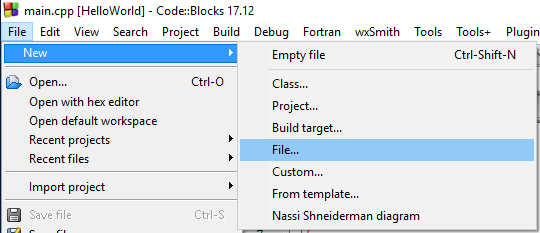
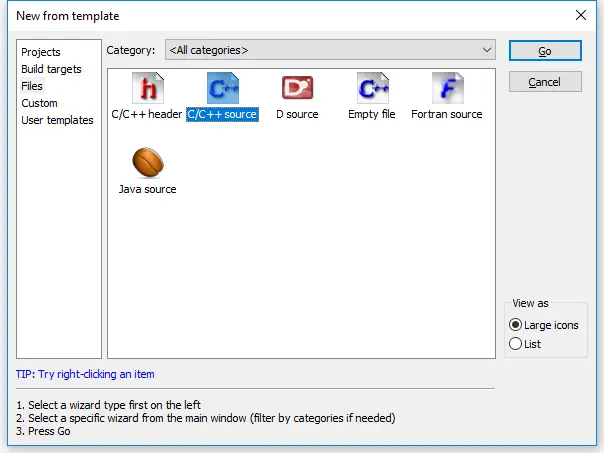
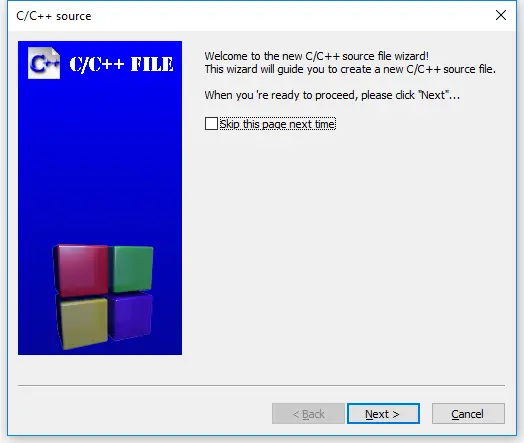
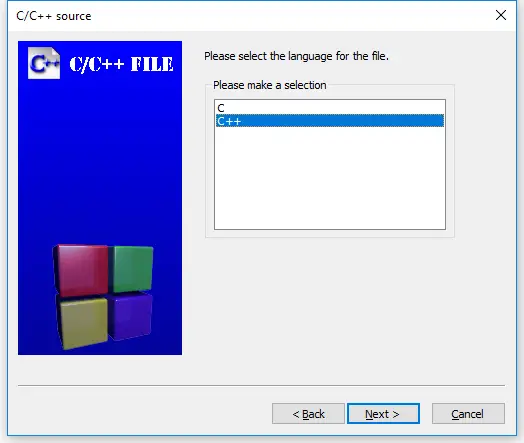
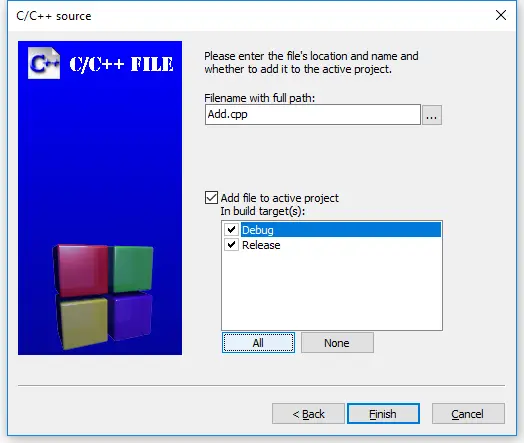
In Code::Blocks, go to the file menu and choose “new file”. Give the new file a name, and Code::Blocks will ask you if you want to add it to the active project. Click “Yes”. Note that you will also have to click the “Release” and “Debug” checkboxes, to make sure it gets added to both versions.

Compile your project just the same as before. Couldn’t be much easier!

Now, consider the following multiple-file program:

add.cpp:

int add(int x, int y)
{
    return x + y;
}

main.cpp:

#include <iostream>

int main()
{
    using namespace std;
    cout << "The sum of 3 and 4 is: " << add(3, 4) << endl;
    return 0;
}

Try compiling this program for yourself. You will note that it doesn’t compile, and it gives the same compiler error as the program in the previous lesson where the functions were declared in the wrong order:

add.cpp(10) : error C3861: 'add': identifier not found
add.cpp(15) : error C2365: 'add' : redefinition; previous definition was 'formerly unknown identifier'

When the compiler is compiling a code file, it does not know about the existence of functions that live in any other files. This is done so that files may have functions or variables that have the same names as those in other files without causing a conflict.

However, in this case, we want main.cpp to know about (and use) the add() function that lives in add.cpp. To give main.cpp access to the add function, we can use a forward declaration:

main.cpp with forward declaration:

#include <iostream>

int add(int x, int y); // forward declaration using function prototype

int main()
{
    using namespace std;
    cout << "The sum of 3 and 4 is: " << add(3, 4) << endl;
    return 0;
}

Now, when the compiler is compiling main.cpp, it will know what add is. Using this method, we can give files access to functions that live in another file. However, as programs grow larger and larger, it becomes tedious to have to forward declare every function you use that lives in a different file. To solve that problem, the concept of header files was introduced. We discuss header files in the lesson on header files.

Try compiling add.cpp and the main.cpp with the forward declaration for yourself. We will begin working with multiple files a lot once we get into object-oriented programming, so now’s as good a time as any to make sure you understand how to add and compile multiple file projects.

1.9 — Header files
Index
1.7 — Forward declarations

97 comments to 1.8 — Programs with multiple files

  • [...] global variables have program scope, they can be used across multiple files. In the section on programs with multiple files, you learned that in order to use a function declared in another file, you have to use a forward [...]

  • vader347

    I got an error using code blocks
    objDebugmain.o||In function `main’:|
    H:CPPmultimain.cpp|8|undefined reference to `add(int, int)’|
    ||=== Build finished: 1 errors, 0 warnings ===|

    using the same code up there

    edit: i fixed it i was using a C file not a CPP

  • vader347

    wait it still doesn’t work same error as before
    this is strange it just compiled perfectly and ran…

  • [...] 2007 Prev/Next Posts « 1.8 — Programs with multiple files | Home | 1.10 — A first look at the preprocessor » Sunday, June 3rd, 2007 at 9:29 [...]

  • [...] 2007 Prev/Next Posts « Recent news box for Tiga 1.0.2 theme (updated) | Home | 1.8 — Programs with multiple files » Saturday, June 2nd, 2007 at 3:01 [...]

  • Attila

    Just 1 additon: Maybe it has been mentioned before, but for the MS Visualblablabla, you need the

    #include "stdafx.h"

    in every single file…

  • Rather interesting. we are getting further and further into this. I think you are doing a very good job thus far.

  • liu

    So if I write down a forward declaration, this can refer to an other file, that’s clear..
    but what if this file is not in the same folder where the main-file is?
    (e.g. i put add.cpp, sub.cpp, mult.cpp, divi.cpp into the folder ‘math’)
    i can’t try it out on myself this week, someone has to tell me that.

  • add doesn't work

    I am new to c++ and programming in general, I can not seem to get this to work, I wrote it myself for the practice, it didnt work I figured it was something I did, so I copied it verbatum and still nothing.
    Any ideas I am using clode blocks 8.02

  • buck

    Hi
    I’m a computer hobbyist and have been exploring C++ as a passtime.
    I have tried all the C++ tutorials I could find over the past few years and I consider this tutorial superior in all aspects from the quality of the content to your approach to teaching the subject.
    I have written and successfuly compiled the project in this section but find it does not output the result (7) to the screen. Should it?
    I should mention I’m using MS Visual C++ 2008 Express.

  • zack

    A little message to anyone using codeblocks, when creating the new add file it asks you to enter the file’s name and location. You have to check the debug and release boxes which appear just below this (although which you need to check depends on the build target I suppose) otherwise it won’t work. I was trying to figure out why it wasn’t working and from the comments above it seems that I’m wasn’t the only one :-)

    • Paul

      I’m going to have to verify Zack’s last comment. With code blocks ide I was unable to compile the files without checking the debug and release box option when creating a new file. I would suggest noting that in the tutorial, it was a bit frustrating trying to figure out why my files could not compile correctly when the code was identical to what was posted in the tutorial.

      Thanks , Paul

  • 13eastie

    I am using a command-line compiler (I have tried g++ and borland’s bcc32).
    I have both of the .cpp files in the same folder.
    Neither of them will compile.
    I’d be very grateful if you could tell me why not.

  • adam

    What if you have int add() in multiple other files. eg. add1.cpp and add2.cpp and main.cpp calls it, will it call the int add() from add1.cpp or from add2.cpp?

    • If you have the same function declared in multiple files and you try and link those files into the same project, the linker will complain that it doesn’t know which version of add() to use.

    • Zeb

      Hello Alex,
      I m new in C++.I coded your coding but cann’t get result,and i can link two files becausa i havn’t Visual C++ compiler.I have C-Free a professional C/C++ IDE.Vession:4.1 Professional.Please guid me…

  • Tony

    How do you use multiple files if you’re not using Visual Studio? I’m using g++.

  • sir,
           how i can compile & run a c++ file in command prompt...plz tell me.
       
    • csvan

      if you are using Linux:

      g++ myFile.cpp -o myProg

      where myFile.cpp is the name of the source file. myProg will be the name of the resulting program. You run it by typing ./myProg

  • #include <iostream>
    using namespace std;
    int a=9;
    
    int add(int x, int y); // forward declaration using function prototype   
    
    int main()
    {
        //using namespace std;
        cout << "The sum of 3 and 4 is: " << add(3, 4) << endl;
        return 0;
    }
    /*this code is in another file*/
    int add(int x, int y)
    {   cout<<a;
        return x + y;
    }
    
  • sra1

    Never mind Alex I got it.
    This tutorial is really really helpful.
    I wish we have a tutorial for java too, please tell me if you have one…
    Thanks again.

  • David

    These two statements you have made don’t seem to agree:

    In the tutorial:
    “When the compiler is compiling a code file, it does not know about the existence of functions that live in any other files. [this sentence-->] This is done so that files may have functions or variables that have the same names as those in other files without causing a conflict.”

    In your comments:
    “If you have the same function declared in multiple files and you try and link those files into the same project, the linker will complain that it doesn’t know which version of add() to use.”

    So which is it? If the compiler complains about having multiple files in the project containing the same function names, then your first statement (tutorial statement) is not true — there is in fact a conflict.

    • Both statements are true.

      The compiler does not know about functions that are defined in other files (unless you use a prototype).

      However, if you have functions with duplicate names in different files (which the compiler will not complain about), the linker will complain, because it doesn’t know which one to resolve the function call to.

  • Mina

    If I don’t add

    #include <iostream>

    to the beginning of the second file (io.cpp) code::blocks complains and says that ‘cin’ is not defined. If I do include it then everything works fine. What might be happening?

    • I am not sure which file you are talking about. However, iostream is the header file that defines what cin is. If you do not #include it, the compiler does not know what cin is and will complain.

  • Michael

    I’ve been trying to figure this out for the past 2 hours and I’m over it. I typed in exactly everything you said to do above and when I went to compile it would always have a link problem. I’m using VS 2008. Maybe in the next lesson I’ll learn what my mistake was. I’m hoping header files will help.

    • Michael

      I also meant to say up to this point these tutorials have been great. I just got stuck on this one and it got frustrating being stuck on it. I noticed from a brief glimpse in the next section it mentions files with the .h extension. I noticed that when trying to compile these 2 different files but it was confusing cause its not mentioned in the section. So maybe the next section will help me. I hope so!

  • Michael

    I think I figured out what I did wrong. When I went to right click on source files–>add–>new item then I noticed that the “Windows Form” was selected when I think I was supposed to have the “C++file(.cpp)” selected instead. I’m not very computer savvy so maybe this is my mistake. I’ll go find out know.

  • Aidan

    Hi All

    Excellent Tutorial this ….

    However when I try to compile and run the main.cpp file ..I get the following error…Both main and Header files are created exactly as they are on this page , with stdafx.h declaration added in the main.cpp file..

    I am using Microsoft Visual Studio 2005

    The error I get is

    >main.obj : error LNK2019: unresolved external symbol “int __cdecl add(int,int)” (?add@@YAHHH@Z) referenced in function _main

    Any help would be hugely appreciated..

    Best Regards

    Aidan

  • devin

    I do every thing you ask me to and it keeps saying that i messed up saying unexpected end of file while looking for precompiled header and yes i do have the #include "stdafx.h" in the text please help me.

  • Pratik Shivarkar

    Great, Im using Code Blocks and MonoDevelope on Linux
    This tutorial works like a charm.

  • Keeks

    I am using CodeBlocks 8.02 in a Mac with Leopard, It is working nicely, until this lesson, when I created a new file as described above it never showed the configuration (the auto tabs and colors) and besides that I weren’t able to build the project. I was trying different approaches to solve this to no avail. Finally the only thing that was needed was to append the extension when creating the file ( .cpp ), after that it worked like a charm.
    Alex, you have made an extupendous work with this Learning Center.
    Keep the great work.

    Keeks

  • tekktronic

    Awesome tutorial!!

    Clean, clear, and concise. Much appreciated, Alex… I’ve been looking for something like this for quite some time now, and I have to say, I recommend your tutorial to anyone who wants to get at C++!! Anyway, I have several questions:

    1. I’m using Code::Blocks 8.0.2, and I was wondering if there was a way to actually get it to save files as .CPP files automatically, that way, the compiler doesn’t trip out everytime a .C files gets put in a project.

    2. Why does the code (matching the code you have above [complete with forward declaration] verbatim, by the way) NOT input what it’s supposed to output (“The sum of 3 and 4 is: 7″) It compiles and runs, but all I get is “press any key to continue” without the specific output (NOT EVEN THE NUMBER 7!!) Is there a cause for this, and how can I fix this??

    3. Do I have to #include to add.cpp, also??

    Thank you kindly for all your efforts!! Kudos!!!

    -tekktronic-

  • Sam

    This is not working for me either.

    I have both debug and release checked. and files main.cpp and add.cpp and cut and pasted code. but when I compile it stops and gives this error on the line where the cout is located in main.

    obj/Debug/main.o||In function `main’:|
    /home/blahblah/C++ LEARNING LAB/Lab1/main.cpp|11|undefined reference to `add(int, int)’|

    sure its something I am doing wrong. But I cannot figure it out

    I have codeblockers on linux and up til now I have not had a problem.

    Best Regards

  • sam

    below is the code lead with the file name:

    main.cpp

    #include <iostream>
    int add(int x, int y);
    
    int main()
    {
        using namespace std;
        cout << "The sum of 3 and 4 is: " << add(3, 4) << endl;
        return 0;
    }
    

    here is the code in 2nd file

    add.cpp

    int add(int x, int y)
    {
        return x + y;
    }
    

    I am using codeblocks on kde 4.3 kubuntu with new gcc++ 4.4 and i have added file “add.cpp” to project and checked marked debug and release.

    when i compile the code with the compile button I get this message

    ————– Build: Debug in Lab1 —————

    Linking console executable: bin/Debug/Lab1
    obj/Debug/main.o: In function `main’:
    /home/blahblah/C++ LEARNING LAB/Lab1/main.cpp:8: undefined reference to `add(int, int)’
    collect2: ld returned 1 exit status
    Process terminated with status 1 (0 minutes, 0 seconds)
    1 errors, 0 warnings

  • sam

    Sorry to post so much. But I experimented and figured it out. it was in the interface. its buggy. when I added add.cpp it showed add to project and ask for check release and debug which I did and made sure ended in .cpp. but I then notice when i rotated my code to one file it worked..so knew the 2nd file even though it was showing was not adding to the compilation. then i noticed when i brought up tree it was light grey on the text. So i deleted it..and clicked add file to project and selected again add.cpp and it became not greyed out on the list…

    now it compiles and works perfect in a 2 file format.

    Best Regards

  • rog

    hi alex thank you so much for this. i know this is a very dumb question to some but i am getting confused if anyone can help out. i’m using studio 2008 and the first e example that you say should return an error is compiling fine for me. is this due to an update or something or am i just misunderstanding?? please anyone, i’m scared to try to move forward without fully understanding

  • rog

    please disregard my last comment. i didnt put the functions in separate files thats why everyone :) !

  • alexandra

    Hey , I added the two files in a project. I use Dev-C++ and when compiling I receive this error:
    Circular maimulte1 <- maimulte1.o dependency dropped.
    Circular maimulte2 <- maimulte2.o dependency dropped.
    G:\c-compiler\Dev-Cpp\LUCRU\Makefile.win [Build Error] [Proiect1.exe] Error 1
    Can you please help me?

    • baldo

      `Circular xxx <- yyy dependency dropped.’
      This means that make detected a loop in the dependency graph: after tracing the prerequisite yyy of target xxx, and its prerequisites, etc., one of them depended on xxx again.

      Maybe you have included the cpp files and made a loop or something.

  • Michael M

    Thanks! Followed the tutorial and it works!

  • Luke

    Hey,

    I’m using Code::blocks 8.02, and it won’t let me add any files to the active project. I can see the box which says “Add file to active project” but it won’t let me check the box. I don’t even get the option to release or debug.

    I have tried making everything .cpp, but nothing changes.

    Any thoughts? Does it have something to do with the fact that my ‘active project’ is just the default workspace.

    If there is a manual way to add files to an existing file I would be thrilled.

    Any help/thoughts are appreciated, and thanks heaps for these tutorials!

    Luke

  • Tyler

    Hi, I know this may sound stupid but i’m brand new to c++ an I cant seem to find Source files on my MS visual 2005 express addition please let me know where they are.

  • retro-starr

    I get “[Linker error] undefined reference to `add(int, int)’” and “ld returned 1 exit status” as errors in dev-c++.

    It’s weird because if I use g++.exe (found inside the directory of dev-c++) it compiles and runs just fine…

  • Jack
     Hi Alex, thanks so much for this tutorial, it's been really helpful so far. I've run into some kind of problem though. When I tried compiling this file I got the following error message 26 times
    Main.cpp(9) : error C2784: 'std::basic_istream &std::operator >>(std::basic_istream &,unsigned char &)' : could not deduce template argument for 'std::basic_istream &' from 'std::ostream'
    1>        G:ProgrammingMicrosoft Visual C++ 2008 ExpressVCincludeistream(1021) : see declaration of 'std::operator >>'
    
    I tried messing around with the programme and I think it's something to do with iostream, I went back and tried to do a simple programme again and I had the same problem. Any idea what's going wrong?  I'm using Microsoft Visual by the way.
    
    THanks!!! 
    
    • D Barber

      if thats a correct copy of the message, it should be ‘iostream’ and you must have put ‘istream’ in your code, not sure if thats all thats wrong though. Also you don’t have to put normal replies in the


      tags, only html stuff. :)

  • Bishal Thapa

    I cannnot compile the file add.cpp. It is giving error LNK2019 and error LNK1120. Please give me the solution as soon as possible.

  • Frost

    It is good to see that a 2008 thread still has comments and questions. That means this is a good tutorial and many newbies(like myself) can learn from it. I cant comment surely on what is your problem Bishal but look at what line gave you the error and in what file. I myself got a few errors till i realized that add.cpp needs “stdafx.h” too. I’m using Visual C++ 2008 and it is pretty straightforward about explaining what the compile error is and where it can be found.
    Thanx Alex for this great tutorial.

  • Sultana

    Error 1 error C2062: type ‘int’ unexpected c:\documents and settings\reception\my documents\visual studio 2008\projects\quiz2\quiz2\main.cpp 6
    Error 2 error C2447: ‘{‘ : missing function header (old-style formal list?) c:\documents and settings\reception\my documents\visual studio 2008\projects\quiz2\quiz2\main.cpp 7
    <pre#include "stdafx.h"
    #include

    int add(int x, int y),

    int main();
    {
    using namespace std;
    cout << "The sum of 3 and 4 is: " << add(3,4) << endl;
    return 0;
    }
    what am i doing wrong? i use Visual Basic from Microsoft 2008

    • Bram Verspeek

      after int add(int x,inty) should be a ;
      after int main() there shouldn’t be a ;
      I think the stdafx.h should be between

       <stdafx.h> 

      instead of ” “

  • armian

    Hi all!
    This tutorial is FANTASTIC!
    dear admin,
    i am using bloodshed dev-cpp
    do i need to use #include?
    when i have the files in a folder but not in a project, they don’t open properly. When i change the folder of the files, they work ok. what should i do to fix this?
    Thank you very very very much!!!

  • Bram Verspeek

    I have a question related to the multiple files programs.
    Is it possible to define a value in the main program and use it in a function without supplying it as an argument?

    Say in main.cpp I have

    int a = 4

    and then in math.cpp I have

    //included so the program knows a should be an integer value
    int a;
    
    //function definitions
    int add(int x,int y)
    {
    	cout << "a = " << a <<endl;
    	return x+y;
    }

    if i run code with this it prints a = 0 instead of a = 4. Is it possible to do this? basically declare global variables that apply in every party of the program? I read a bit on so would a #define do what I want?

  • Chip

    Hi.

    I was trying to declare some struct types and enum types along with a few variables (of those types)in a separate file. In the header file I’ve just included declaration of the variables with the extern keyword. (Yes, I’m using global variables, but I’m new to C++ and i couldn’t figure out any other way. Besides it’s not that big of a program to be that difficult to track down the variables.) But when the compiler gets to

    #include “buildings.h” //the header file

    it gives an error because it doesn’t recognize the structs I’ve declared in the separate file as types. If I declare the types in the main file before the line

    #include “buildings.h”

    it’s all OK, but my idea was to keep the whole program somewhat clean so the types declarations and the variables of that types to be in the same separate file.

    Is there something I could do to make the whole project easier to understand by keeping the variables and their custom made types (structs, enums)in one file and each function in a separate file, without having to crowd the main file code with type declarations?

    P.S. Great lessons. Very comprehensible.

  • Mariusz

    Hi,
    I have a problem with Code::Blocks. I’ve successfully followed all instructions in this chapter up to a point : “In Code::Blocks, go to the file menu and choose “new file”…” and so on. I have no clue on what to do at this point. I’m using Visual C++ 2005 Express and can’t even locate Code::Blocks. I’m completely lost at this point.
    Please, anyone help me.

  • villain222

    ok. i found my problem with code::blocks. whatever your second file is, you just have to goto the left tree window and right click your file (not the main) pick properties goto build tab and make sure compile and Link boxes are checked as well as the debug and release. once i did that I had no problems. why it wasn’t already set? not sure.

  • Kraig

    For Visual Studio users you need to have the code in add.cpp as follows

    #include “stdafx.h”

    #include

    int add(int x, int y)
    {
    return x + y;
    }

  • I tried compiling my main.cpp in Miscrosoft Visual Studio 2010 and I got this error.

    1>Test2.obj : error LNK2005: _main already defined in main.obj
    1>c:usersherminedocumentsvisual studio 2010ProjectsTest2DebugTest2.exe : fatal error LNK1169: one or more multiply defined symbols found

  • Ultimaniac

    So easy to understand! Thank you so much for this tutorial. This was my first test for myself:

    main.cpp

    #include "Stdafx.h"
    #include 
    
    int add(int x, int y);
    
    int multiply(int y, int z);
    
    int main()
    {
        using namespace std;
        cout << "3 + (5 * 6) = " << add(3, multiply(5, 6)) << endl;
        return 0;
    }pre>
    
    add.cpp
    
    
    multiply.cpp
    
    I'm so proud of myself =D On to the next lesson!
  • Adele

    Hi

    I am running this on my Mac. I get the message when I compile with “g++ -o main main.cpp”

    Undefined symbols:
    “add(int, int)”, referenced from:
    _main in ccgnrmBk.o
    ld: symbol(s) not found
    collect2: ld returned 1 exit status

    What is wrong?

You must be logged in to post a comment.