

Pointers are one of C++’s historical boogeymen, and a place where many aspiring C++ learners have gotten stuck. However, as you’ll see shortly, pointers are nothing to be scared of.
In fact, pointers behave a lot like lvalue references. But before we explain that further, let’s do some setup.
Related content
If you’re rusty or not familiar with lvalue references, now would be a good time to review them. We cover lvalue references in lessons 12.3 -- Lvalue references, 12.4 -- Lvalue references to const, and 12.5 -- Pass by lvalue reference.
Consider a normal variable, like this one:
char x {}; // chars use 1 byte of memorySimplifying a bit, when the code generated for this definition is executed, a piece of memory from RAM will be assigned to this object. For the sake of example, let’s say that the variable x is assigned memory address 140. Whenever we use variable x in an expression or statement, the program will go to memory address 140 to access the value stored there.
The nice thing about variables is that we don’t need to worry about what specific memory addresses are assigned, or how many bytes are required to store the object’s value. We just refer to the variable by its given identifier, and the compiler translates this name into the appropriately assigned memory address. The compiler takes care of all the addressing.
This is also true with references:
int main()
{
    char x {}; // assume this is assigned memory address 140
    char& ref { x }; // ref is an lvalue reference to x (when used with a type, & means lvalue reference)

    return 0;
}
Because ref acts as an alias for x, whenever we use ref, the program will go to memory address 140 to access the value. Again the compiler takes care of the addressing, so that we don’t have to think about it.
The address-of operator (&)
Although the memory addresses used by variables aren’t exposed to us by default, we do have access to this information. The address-of operator (&) returns the memory address of its operand. This is pretty straightforward:
#include <iostream>

int main()
{
    int x{ 5 };
    std::cout << x << '\n';  // print the value of variable x
    std::cout << &x << '\n'; // print the memory address of variable x

    return 0;
}
On the author’s machine, the above program printed:
5
0027FEA0
In the above example, we use the address-of operator (&) to retrieve the address assigned to variable x and print that address to the console. Memory addresses are typically printed as hexadecimal values (we covered hex in lesson 5.3 -- Numeral systems (decimal, binary, hexadecimal, and octal)), often without the 0x prefix.
For objects that use more than one byte of memory, address-of will return the memory address of the first byte used by the object.
Tip
The & symbol tends to cause confusion because it has different meanings depending on context:
- When following a type name, & denotes an lvalue reference:
int& ref. - When used in a unary context in an expression, & is the address-of operator:
std::cout << &x. - When used in a binary context in an expression, & is the Bitwise AND operator:
std::cout << x & y.
The dereference operator (*)
Getting the address of a variable isn’t very useful by itself.
The most useful thing we can do with an address is access the value stored at that address. The dereference operator (*) (also occasionally called the indirection operator) returns the value at a given memory address as an lvalue:
#include <iostream>

int main()
{
    int x{ 5 };
    std::cout << x << '\n';  // print the value of variable x
    std::cout << &x << '\n'; // print the memory address of variable x

    std::cout << *(&x) << '\n'; // print the value at the memory address of variable x (parentheses not required, but make it easier to read)

    return 0;
}
On the author’s machine, the above program printed:
5
0027FEA0
5
This program is pretty simple. First we declare a variable x and print its value. Then we print the address of variable x. Finally, we use the dereference operator to get the value at the memory address of variable x (which is just the value of x), which we print to the console.
Key insight
Given a memory address, we can use the dereference operator (*) to get the value at that address (as an lvalue).
The address-of operator (&) and dereference operator (*) work as opposites: address-of gets the address of an object, and dereference gets the object at an address.
Tip
Although the dereference operator looks just like the multiplication operator, you can distinguish them because the dereference operator is unary, whereas the multiplication operator is binary.
Getting the memory address of a variable and then immediately dereferencing that address to get a value isn’t that useful either (after all, we can just use the variable to access the value).
But now that we have the address-of operator (&) and dereference operator (*) added to our toolkits, we’re ready to talk about pointers.
Pointers
A pointer is an object that holds a memory address (typically of another variable) as its value. This allows us to store the address of some other object to use later.
As an aside…
In modern C++, the pointers we are talking about here are sometimes called “raw pointers” or “dumb pointers”, to help differentiate them from “smart pointers” that were introduced into the language more recently. We cover smart pointers in chapter 22.
A type that specifies a pointer (e.g. int*) is called a pointer type. Much like reference types are declared using an ampersand (&) character, pointer types are declared using an asterisk (*):
int;  // a normal int
int&; // an lvalue reference to an int value

int*; // a pointer to an int value (holds the address of an integer value)
To create a pointer variable, we simply define a variable with a pointer type:
int main()
{
    int x { 5 };    // normal variable
    int& ref { x }; // a reference to an integer (bound to x)

    int* ptr;       // a pointer to an integer

    return 0;
}
Note that this asterisk is part of the declaration syntax for pointers, not a use of the dereference operator.
Best practice
When declaring a pointer type, place the asterisk next to the type name.
Warning
Although you generally should not declare multiple variables on a single line, if you do, the asterisk has to be included with each variable.
int* ptr1, ptr2;   // incorrect: ptr1 is a pointer to an int, but ptr2 is just a plain int!
int* ptr3, * ptr4; // correct: ptr3 and ptr4 are both pointers to an int
Although this is sometimes used as an argument to not place the asterisk with the type name (instead placing it next to the variable name), it’s a better argument for avoiding defining multiple variables in the same statement.
Pointer initialization
Like normal variables, pointers are not initialized by default. A pointer that has not been initialized is sometimes called a wild pointer. Wild pointers contain a garbage address, and dereferencing a wild pointer will result in undefined behavior. Because of this, you should always initialize your pointers to a known value.
Best practice
Always initialize your pointers.
int main()
{
    int x{ 5 };

    int* ptr;        // an uninitialized pointer (holds a garbage address)
    int* ptr2{};     // a null pointer (we'll discuss these in the next lesson)
    int* ptr3{ &x }; // a pointer initialized with the address of variable x

    return 0;
}
Since pointers hold addresses, when we initialize or assign a value to a pointer, that value has to be an address. Typically, pointers are used to hold the address of another variable (which we can get using the address-of operator (&)).
Once we have a pointer holding the address of another object, we can then use the dereference operator (*) to access the value at that address. For example:
#include <iostream>

int main()
{
    int x{ 5 };
    std::cout << x << '\n'; // print the value of variable x

    int* ptr{ &x }; // ptr holds the address of x
    std::cout << *ptr << '\n'; // use dereference operator to print the value at the address that ptr is holding (which is x's address)

    return 0;
}
This prints:
5
5
Conceptually, you can think of the above snippet like this:
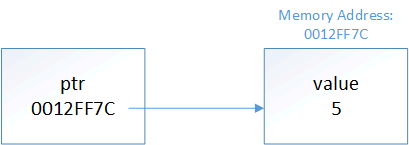
This is where pointers get their name from -- ptr is holding the address of x, so we say that ptr is “pointing to” x.
Author’s note
A note on pointer nomenclature: “X pointer” (where X is some type) is a commonly used shorthand for “pointer to an X”. So when we say, “an integer pointer”, we really mean “a pointer to an integer”. This understanding will be valuable when we talk about const pointers.
Much like the type of a reference has to match the type of object being referred to, the type of the pointer has to match the type of the object being pointed to:
int main()
{
    int i{ 5 };
    double d{ 7.0 };

    int* iPtr{ &i };     // ok: a pointer to an int can point to an int object
    int* iPtr2 { &d };   // not okay: a pointer to an int can't point to a double object
    double* dPtr{ &d };  // ok: a pointer to a double can point to a double object
    double* dPtr2{ &i }; // not okay: a pointer to a double can't point to an int object

    return 0;
}
With one exception that we’ll discuss next lesson, initializing a pointer with a literal value is disallowed:
int* ptr{ 5 }; // not okay
int* ptr{ 0x0012FF7C }; // not okay, 0x0012FF7C is treated as an integer literal
Pointers and assignment
We can use assignment with pointers in two different ways:
- To change what the pointer is pointing at (by assigning the pointer a new address)
- To change the value being pointed at (by assigning the dereferenced pointer a new value)
First, let’s look at a case where a pointer is changed to point at a different object:
#include <iostream>

int main()
{
    int x{ 5 };
    int* ptr{ &x }; // ptr initialized to point at x

    std::cout << *ptr << '\n'; // print the value at the address being pointed to (x's address)

    int y{ 6 };
    ptr = &y; // // change ptr to point at y

    std::cout << *ptr << '\n'; // print the value at the address being pointed to (y's address)

    return 0;
}
The above prints:
5
6
In the above example, we define pointer ptr, initialize it with the address of x, and dereference the pointer to print the value being pointed to (5). We then use the assignment operator to change the address that ptr is holding to the address of y. We then dereference the pointer again to print the value being pointed to (which is now 6).
Now let’s look at how we can also use a pointer to change the value being pointed at:
#include <iostream>

int main()
{
    int x{ 5 };
    int* ptr{ &x }; // initialize ptr with address of variable x

    std::cout << x << '\n';    // print x's value
    std::cout << *ptr << '\n'; // print the value at the address that ptr is holding (x's address)

    *ptr = 6; // The object at the address held by ptr (x) assigned value 6 (note that ptr is dereferenced here)

    std::cout << x << '\n';
    std::cout << *ptr << '\n'; // print the value at the address that ptr is holding (x's address)

    return 0;
}
This program prints:
5
5
6
6
In this example, we define pointer ptr, initialize it with the address of x, and then print the value of both x and *ptr (5). Because *ptr returns an lvalue, we can use this on the left hand side of an assignment statement, which we do to change the value being pointed at by ptr to 6. We then print the value of both x and *ptr again to show that the value has been updated as expected.
Key insight
When we use a pointer without a dereference (ptr), we are accessing the address held by the pointer. Modifying this (ptr = &y) changes what the pointer is pointing at.
When we dereference a pointer (*ptr), we are accessing the object being pointed at. Modifying this (*ptr = 6;) changes the value of the object being pointed at.
Pointers behave much like lvalue references
Pointers and lvalue references behave similarly. Consider the following program:
#include <iostream>

int main()
{
    int x{ 5 };
    int& ref { x };  // get a reference to x
    int* ptr { &x }; // get a pointer to x

    std::cout << x;
    std::cout << ref;  // use the reference to print x's value (5)
    std::cout << *ptr << '\n'; // use the pointer to print x's value (5)

    ref = 6; // use the reference to change the value of x
    std::cout << x;
    std::cout << ref;  // use the reference to print x's value (6)
    std::cout << *ptr << '\n'; // use the pointer to print x's value (6)

    *ptr = 7; // use the pointer to change the value of x
    std::cout << x;
    std::cout << ref;  // use the reference to print x's value (7)
    std::cout << *ptr << '\n'; // use the pointer to print x's value (7)

    return 0;
}
This program prints:
555
666
777
In the above program, we create a normal variable x with value 5, and then create an lvalue reference and a pointer to x. Next, we use the lvalue reference to change the value from 5 to 6, and show that we can access that updated value via all three methods. Finally, we use the dereferenced pointer to change the value from 6 to 7, and again show that we can access the updated value via all three methods.
Thus, pointers and references both provide a way to indirectly access another object. The primary difference is that with pointers, we need to explicitly get the address to point at, and we have to explicitly dereference the pointer to get the value. With references, the address-of and dereference happens implicitly.
There are some other differences between pointers and references worth mentioning:
- References must be initialized, pointers are not required to be initialized (but should be).
- References are not objects, pointers are.
- References can not be reseated (changed to reference something else), pointers can change what they are pointing at.
- References must always be bound to an object, pointers can point to nothing (we’ll see an example of this in the next lesson).
- References are “safe” (outside of dangling references), pointers are inherently dangerous (we’ll also discuss this in the next lesson).
The address-of operator returns a pointer
It’s worth noting that the address-of operator (&) doesn’t return the address of its operand as a literal (as C++ doesn’t support address literals). Instead, it returns a pointer to the operand (whose value is the address of the operand). In other words, given variable int x, &x returns an int* holding the address of x.
We can see this in the following example:
#include <iostream>
#include <typeinfo>

int main()
{
	int x{ 4 };
	std::cout << typeid(x).name() << '\n';  // print the type of x
	std::cout << typeid(&x).name() << '\n'; // print the type of &x

	return 0;
}
On Visual Studio, this printed:
int
int *
With gcc, this printed i (int) and pi (pointer to int) instead. Because the result of typeid().name() is compiler-dependent, your compiler may print something different, but it will have the same meaning.
The size of pointers
The size of a pointer is dependent upon the architecture the executable is compiled for -- a 32-bit executable uses 32-bit memory addresses -- consequently, a pointer on a 32-bit machine is 32 bits (4 bytes). With a 64-bit executable, a pointer would be 64 bits (8 bytes). Note that this is true regardless of the size of the object being pointed to:
#include <iostream>

int main() // assume a 32-bit application
{
    char* chPtr{};        // chars are 1 byte
    int* iPtr{};          // ints are usually 4 bytes
    long double* ldPtr{}; // long doubles are usually 8 or 12 bytes

    std::cout << sizeof(chPtr) << '\n'; // prints 4
    std::cout << sizeof(iPtr) << '\n';  // prints 4
    std::cout << sizeof(ldPtr) << '\n'; // prints 4

    return 0;
}
The size of the pointer is always the same. This is because a pointer is just a memory address, and the number of bits needed to access a memory address is constant.
Dangling pointers
Much like a dangling reference, a dangling pointer is a pointer that is holding the address of an object that is no longer valid (e.g. because it has been destroyed).
Dereferencing a dangling pointer (e.g. in order to print the value being pointed at) will lead to undefined behavior, as you are trying to access an object that is no longer valid.
Perhaps surprisingly, the standard says “Any other use of an invalid pointer value has implementation-defined behavior”. This means that you can assign an invalid pointer a new value, such as nullptr (because this doesn’t use the invalid pointer’s value). However, any other operations that use the invalid pointer’s value (such as copying or incrementing an invalid pointer) will yield implementation-defined behavior.
Key insight
Dereferencing an invalid pointer will lead to undefined behavior. Any other use of an invalid pointer value is implementation-defined.
Here’s an example of creating a dangling pointer:
#include <iostream>

int main()
{
    int x{ 5 };
    int* ptr{ &x };

    std::cout << *ptr << '\n'; // valid

    {
        int y{ 6 };
        ptr = &y;

        std::cout << *ptr << '\n'; // valid
    } // y goes out of scope, and ptr is now dangling

    std::cout << *ptr << '\n'; // undefined behavior from dereferencing a dangling pointer

    return 0;
}
The above program will probably print:
5
6
6
But it may not, as the object that ptr was pointing at went out of scope and was destroyed at the end of the inner block, leaving ptr dangling.
Conclusion
Pointers are variables that hold a memory address. They can be dereferenced using the dereference operator (*) to retrieve the value at the address they are holding. Dereferencing a wild or dangling (or null) pointer will result in undefined behavior and will probably crash your application.
Pointers are both more flexible than references and more dangerous. We’ll continue to explore this in the upcoming lessons.
Quiz time
Question #1
What values does this program print? Assume a short is 2 bytes, and a 32-bit machine.
#include <iostream>

int main()
{
	short value{ 7 }; // &value = 0012FF60
	short otherValue{ 3 }; // &otherValue = 0012FF54

	short* ptr{ &value };

	std::cout << &value << '\n';
	std::cout << value << '\n';
	std::cout << ptr << '\n';
	std::cout << *ptr << '\n';
	std::cout << '\n';

	*ptr = 9;

	std::cout << &value << '\n';
	std::cout << value << '\n';
	std::cout << ptr << '\n';
	std::cout << *ptr << '\n';
	std::cout << '\n';

	ptr = &otherValue;

	std::cout << &otherValue << '\n';
	std::cout << otherValue << '\n';
	std::cout << ptr << '\n';
	std::cout << *ptr << '\n';
	std::cout << '\n';

	std::cout << sizeof(ptr) << '\n';
	std::cout << sizeof(*ptr) << '\n';

	return 0;
}Question #2
What’s wrong with this snippet of code?
int v1{ 45 };
int* ptr{ &v1 }; // initialize ptr with address of v1

int v2 { 78 };
*ptr = &v2;     // assign ptr to address of v2